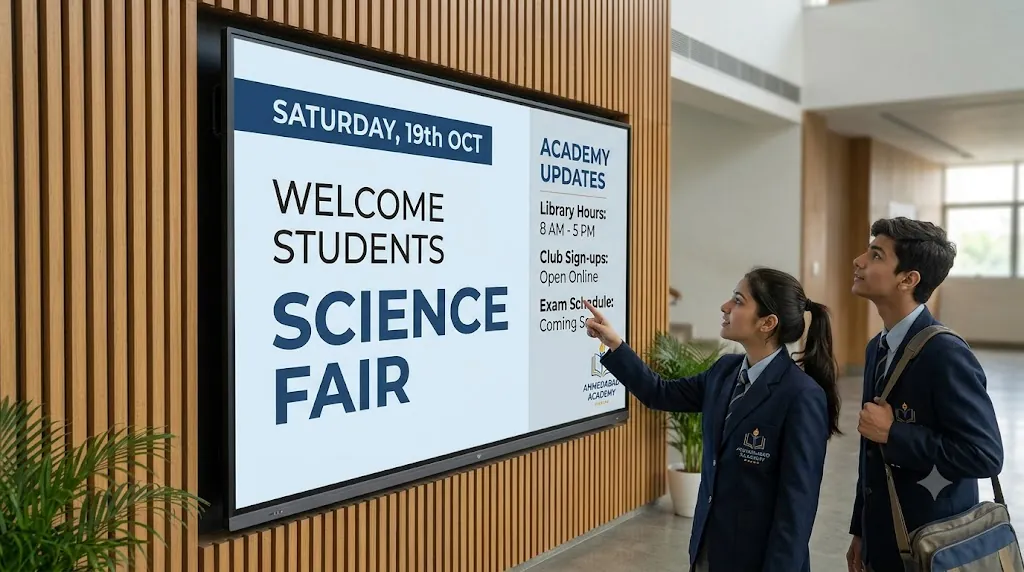
Managing school-wide communication across sprawling buildings or multiple campuses is a major challenge for modern education leaders. Paper flyers on cork notice boards get torn down, emails to students go unread, and updating physical posters takes hours of staff time.
With modern digital signage for schools, educational institutions replace dated bulletin boards with vibrant, cloud-connected TV screens. A cloud-managed digital display board for schools allows administrators to schedule morning announcements, display exam room assignments, push cafeteria menus, and broadcast instant emergency alerts to every campus screen from a single mobile app or web dashboard using Loco Digital Signage.
Modernize Your School Campus Screens
Turn affordable Smart TVs or Fire TV Sticks into a powerful digital display board for schools. Group screens by campus and publish notices in seconds.
Start 3-Day Free Trial — No Credit Card RequiredTop 6 Ways Schools Use Digital Signage Across Campus
Implementing school digital signage transforms everyday communication by delivering targeted information right where students, teachers, and parents congregate:
1. Daily Announcements
Broadcast morning notices, timetable adjustments, bell schedules, and club assembly alerts in high-traffic corridors and homerooms.
2. Emergency & Weather Alerts
Instantly override all campus screens with bold, full-screen safety messages, fire drill routes, severe weather warnings, or lockdown instructions.
3. Student Achievements
Celebrate athletic championships, honor roll recipients, art exhibitions, and STEM fair winners to foster school pride and boost motivation.
4. Cafeteria Menu Boards
Display breakfast and lunch menus, daily specials, dietary allergen warnings, and meal prices clearly on digital display boards in the dining hall.
5. Visitor Welcome & Wayfinding
Greet visiting parents, guest speakers, and admission candidates in the reception lobby with branded welcome slides and campus maps.
6. Staff Room Bulletins
Keep faculty aligned with meeting agendas, curriculum reminders, professional development schedules, and school board updates.
How Multi-Campus Digital Signage Management Works
Whether your school operates a single building or a multi-campus educational trust, cloud-based school screen management makes administration effortless:
- Centralized Cloud Control: Update screens across junior, middle, and senior campuses simultaneously from your laptop or phone — no on-site IT visits needed.
- Zone & Department Screen Grouping: Group screens by location (e.g., Main Reception, Science Wing, Cafeteria, Sports Complex) to send targeted content to specific screens with one click.
- Automated Day-Part Scheduling: Schedule morning announcements from 7:30 to 9:00 AM, switch automatically to lunch menus from 11:30 AM to 1:30 PM, and show bus departure routes in the afternoon.
- Offline Playback Continuity: Campus Wi-Fi drops won't disrupt your screens. Loco caches images, videos, and slides locally on the player device so displays remain 100% active.
- Direct PDF & Canva Integration: Upload official school notification letters, exam timetables, or event flyers directly from PDFs or design eye-catching slides with Canva.
- No Costly Proprietary Hardware: Avoid lock-in to specialized hardware. Turn any HDMI television into a smart display using affordable streaming devices.
How to Set Up School Digital Signage in 3 Easy Steps
Install the Player App
Download Loco Digital Signage Player from the Google Play Store, Amazon Appstore, or Apple tvOS App Store on your school TVs.
Pair Your Screen
Open the app on your TV to view the 6-digit connection code or QR code. Enter the code in your Loco mobile app or web portal to link instantly.
Publish & Schedule
Upload event flyers, announcements, or timetables, select target screens or campus groups, and tap publish! Your screens sync in real time.
Frequently Asked Questions
Related Guides & Solutions
Follow Loco Signage on Google
Add Loco Signage as a Preferred Source to get our latest guides & education tutorials directly in Google Search.
Ready to Modernize Your School Screens?
Join schools, colleges, and education networks using Loco to keep students informed, promote campus events, and manage screens from one place.
Free trial available • No credit card required • Works with existing Smart TVs & Fire TV