FITNESS & GYMS • July 31, 2026 • 6 min read

Gym Digital Signage Guide: How Gym Owners Control Screens & Motivate Members From Anywhere

Transform your fitness center with high-energy lobby displays, real-time class timetables, personal trainer spotlights, and cloud remote control across all your locations.

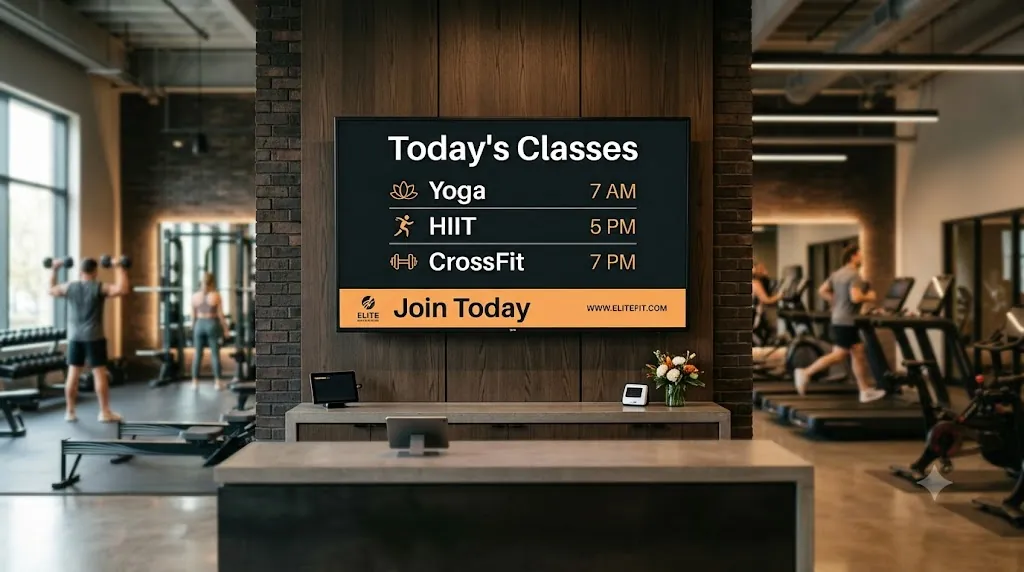
Gym Digital Signage Class Schedule & Fitness Motivation Display

In the modern fitness industry, atmosphere is everything. When a member steps through your gym doors, they aren't just buying access to barbells and treadmills — they are investing in energy, accountability, community, and results.

Yet many gym owners and fitness club managers still rely on outdated paper posters taped to front desks, messy whiteboard class schedules, or uninspired static TV screens. These static methods fade into the background, waste staff time, and fail to capture the high-energy culture of your brand.

With Loco Digital Signage, gym owners can transform any Smart TV (Apple TV, Android TV, Fire TV, Google TV) into a dynamic, high-converting digital communication center. Whether you operate a boutique CrossFit box, a 24/7 local fitness club, or a multi-location gym franchise, Loco lets you control every screen in your facility remotely from anywhere in the world using your phone or Mac dashboard.

Why Modern Gym Owners Are Upgrading to Digital Signage:
  • Instant Remote Updates: Change schedules, announcements, or promos from home, on the road, or between client sessions.
  • Higher Class Attendance: Keep group fitness timetables, room assignments, and upcoming workshops front-and-center.
  • Increased Personal Training & Supplement Revenue: Showcase trainer credentials, transformation stories, and high-margin PT packages.
  • Enhanced Community Motivation: Celebrate member personal records (PRs), member-of-the-month spotlights, and workout tips.
  • Multi-Branch Franchise Controls: Push unified branding and localized promotions across all gym locations with one click.

1. Remote Multi-Screen Control: Manage One or One Hundred Gym Displays From Anywhere

One of the biggest headaches for gym managers is content management across multiple zones. You might have a lobby screen at reception, workout floor displays near the cardio equipment, studio screens for group classes, and TV screens in locker rooms.

Previously, updating these screens required manually swapping USB drives or navigating clunky legacy software. With Loco Digital Signage, content management is seamless:

  • Cloud Remote Management: Log into your Loco dashboard on your iPhone, Android phone, or Mac app. Upload new promotional slides, schedule video loops, or update class times, and broadcast them instantly to TV screens worldwide.
  • Multi-Zone Display Layouts: Run split-screen layouts combining live workout video loops, upcoming class schedules, sponsor ads, and real-time announcements simultaneously on a single screen.
  • Multi-Branch Management: Own multiple gym locations? Group your screens by location or zone. Push global franchise branding to every branch instantly while allowing local managers to customize class times.

2. Gym Lobby Signage: Turn Your Reception Into a Motivation & Sales Engine

Your gym lobby is the first touchpoint for walk-in prospects and daily members. A blank or poorly utilized lobby TV is a missed opportunity for community building and revenue growth.

A. High-Energy Branded Welcome Displays

Greet prospective members with crisp, high-definition video signage loops showcasing your facility, high-intensity workouts, and clean amenities. First impressions set the tone for membership conversions.

B. Member Spotlights & Before-and-After Transformations

Nothing motivates gym members more than seeing real results from their peers. Use Loco slideshows to spotlight member transformation stories, "Member of the Month" honors, and personal best milestones. This builds social proof and deepens member loyalty.

C. Personal Trainer Profiles & Package Upsells

Boost your personal training revenue by rotating trainer bio slides. Highlight their certifications, specialized training styles (e.g., strength conditioning, weight loss, rehab), client testimonials, and current session package deals. When members see trainer success stories while waiting in the lobby, personal training inquiries soar.


3. Workout Floor & Studio Screens: Driving Engagement & Retention

Once members are on the gym floor, strategic digital displays keep their energy high and ensure they take full advantage of your facility's offerings:

  • Real-Time Group Class Timetables: Display automated daily schedules for Spin, HIIT, Yoga, Boxing, and CrossFit classes. Highlight upcoming sessions ("Starting in 15 Minutes in Studio B") to drive walk-in participation.
  • Motivational Exercise & Form Video Loops: Stream short, looping clips of proper lifting form, stretching routines, and workout inspiration to keep members engaged between sets.
  • QR Code Integration for Frictionless Actions: Embed scannable QR codes on your screens. Members can quickly scan their phones to book a personal training assessment, sign up for a 30-day fitness challenge, or order protein shakes from your juice bar.
  • Pro Shop & Supplement Promotion: Highlight high-margin retail items like pre-workouts, branded gym apparel, shaker bottles, and locker rentals directly on floor displays.

4. Empowering Gym Staff & Trainers

Digital signage isn't just for members — it's a powerful tool to motivate your fitness team:

By featuring "Trainer of the Month" awards, class attendance milestones, and top sales achievements on public screens, you create a culture of recognition and pride among your staff. Furthermore, because screens are updated in seconds via cloud remote control, your front-desk staff no longer waste hours printing schedules, cutting paper notices, or fixing tape on walls.


5. 24/7 Gym Reliability: Offline Caching With Zero Downtime

Many modern gyms operate 24 hours a day, 7 days a week with unstaffed hours. If your internet connection flickers at 2:00 AM, you cannot afford to have your digital noticeboards crash or display error screens.

Loco is engineered for maximum reliability. Media playlists, class timetables, and video loops are automatically cached locally on the TV player device (Apple TV, Android TV, Fire TV). Even if your ISP experiences an outage, your gym screens continue playing seamlessly 24/7 without interruption.


6. How to Set Up Loco Digital Signage in Your Gym in 3 Simple Steps

STEP 1
Install TV Player App

Download the Loco Digital Signage Player app on your Apple TV, Android TV, Amazon Fire TV Stick, or Google TV screen.

STEP 2
Pair Your Device

Open the Loco controller app on your phone or Mac and scan the pairing QR code displayed on your TV screen.

STEP 3
Publish From Anywhere

Upload video loops, class timetables, or promos. Hit publish to instantly update screens across all gym branches from anywhere.


ELEVATE YOUR FITNESS BRAND

Ready to Energize Your Gym Screens?

Join fitness centers, boutique studios, and gym franchises using Loco Digital Signage to drive engagement, boost trainer sales, and manage displays effortlessly from anywhere.